Running a personal-chef business from one place.
Friend sends private chefs into clients’ homes. I designed the platform that runs the business behind them: timesheets that work offline, reimbursements and payments, rates, reports, and the permissions that keep five roles in their lane.
- My role
- Sole designer, discovery to handoff (2019)
- Product
- Operations platform for a personal-chef service
- Platform
- Progressive web app, offline-first
- Worked with
- Client stakeholders and the engineering team
5
user roles
7
product modules
5
permission levels per module
4
rate types per city
Offline
first, for on-site chefs
The problem: admin came last, so chefs got paid late.
Chefs juggle back-to-back bookings, prep and travel. Logging hours, uploading receipts and chasing payments always came last, so payments were late and everyone was frustrated. The client wanted it all in one place, with four goals and two hard limits.
Goals
Track chefs’ time
Arrival, departure and drive time, per job.
Track charges
Rates, adjustments, tips and what’s due.
Reimburse expenses
Receipts uploaded, reviewed and paid, with clear status.
Speed up reporting
Hours by city and employee, without spreadsheets.
Constraints
Works offline
Most users are on site, often in kitchens without signal.
One progressive web app
Responsive, installable, used mostly on phones.
Five roles, five jobs
| Admin | Runs the platform: users, roles, permissions, content |
| Manager | Oversees chefs and service quality |
| Chef | Cooks on site and logs time, often offline |
| Office | Schedules chefs, supports clients, coordinates changes |
| Accounts | Bills clients, pays chefs, handles refunds |
What I fixed first: the structure, not a screen.
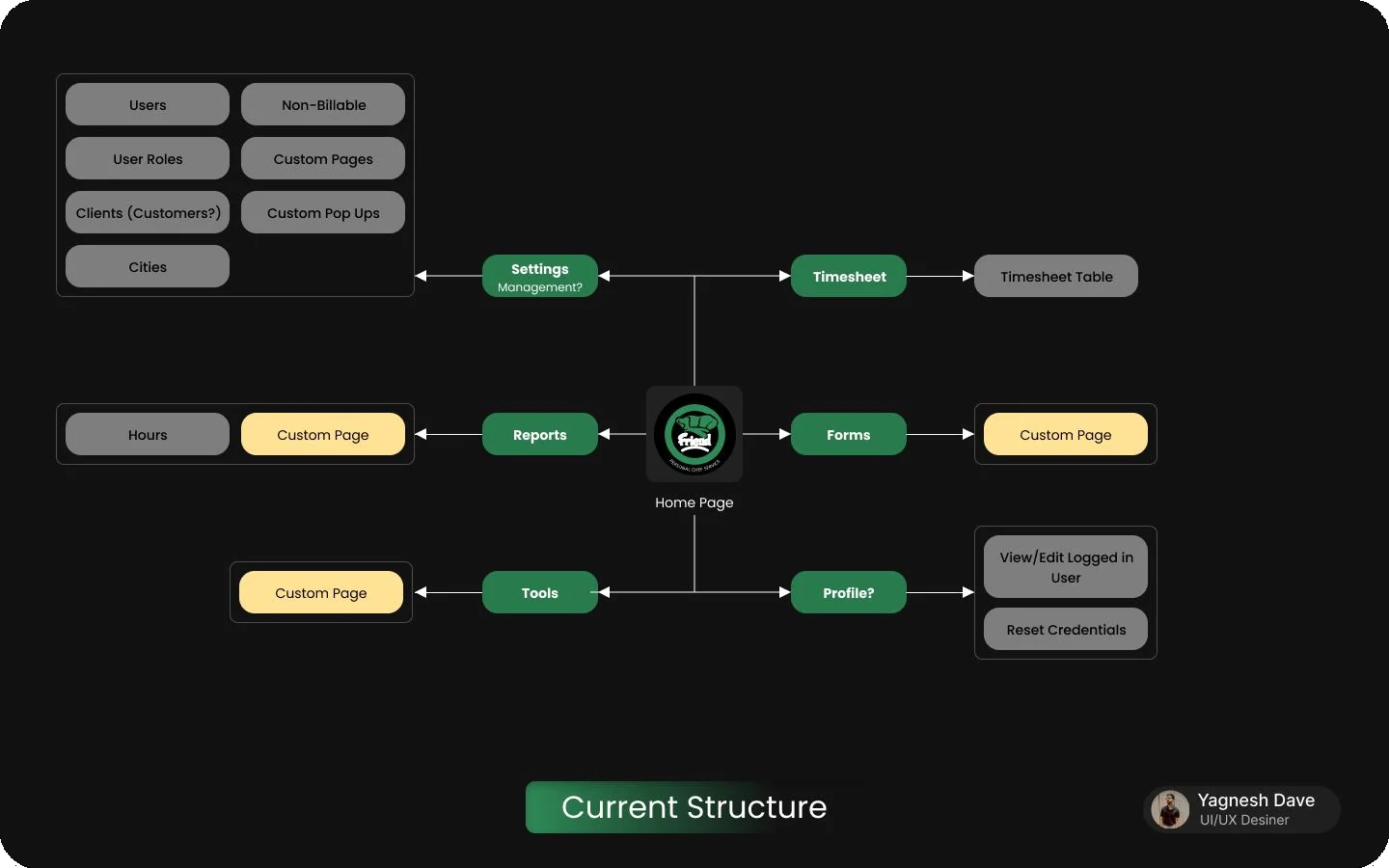
In discovery workshops we mapped the existing product. Most features sat under one Settings menu, so nobody could find anything. I reorganised it around what each role actually does.
Before
After
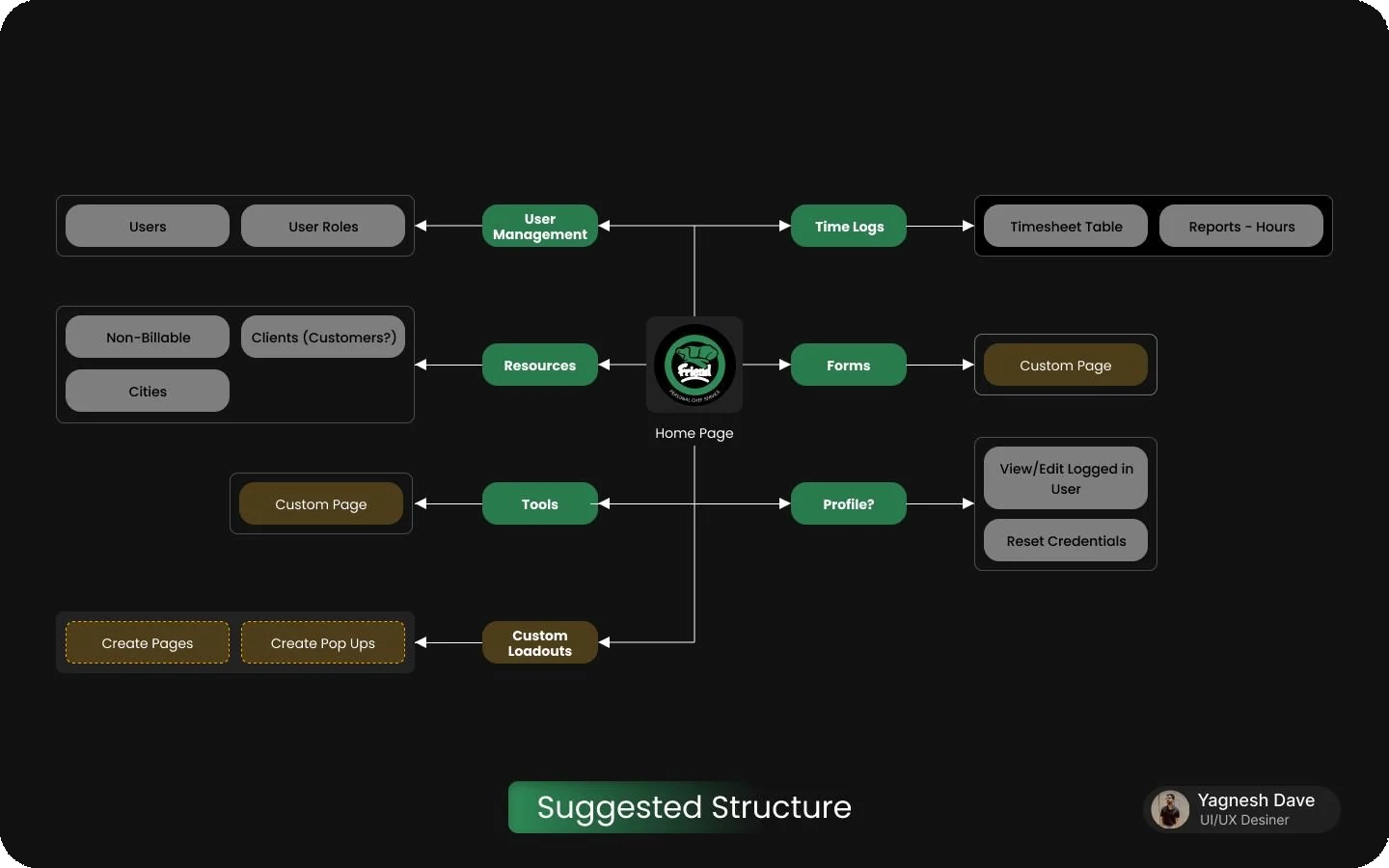
Settings stopped being a drawer for everything
Users and roles became User management. Clients, cities and non-billable reasons became Resources.
Time and reports moved together
Timesheets and hour reports now live under one Time logs area, because they’re used together.
Admins build their own pages
A new Custom loadouts area lets admins create pages and pop-ups with access levels, without a developer.
The rules: what each role can see and do.
Before detailed design, I wrote down each module: its fields, its actions, and who can use them. Two parts held most of the complexity.
A permission matrix per role
Admins create roles and tick exactly what each can do in each module. Example below: a chef’s role.
| Module | None | Add | View | Edit | Delete |
|---|---|---|---|---|---|
| City form | |||||
| Client form | |||||
| Timesheet | |||||
| Reports and hours | |||||
| Custom pages | |||||
| Custom pop-ups |
A timesheet that calculates pay
Each entry captures time, money and status, and rates are set per city, including a holding fee.
Time
Money
Non-billable reasons
Status
Part 2 of 2
The shift, the screens and the bill.