A patient’s story, ready before they sit down.
A proposed AI feature for I-Digi Care: a short summary of each patient’s history, waiting at the top of the diagnosis sheet. The AI drafts. The doctor decides.
- Product
- I-Digi Care, for OPD doctors
- My role
- Product designer, concept to screens
- Status
- Proposed concept, not yet approved
- Built on
- The I-Digi Care design system
All patient details in this case study are illustrative.
Doctors don’t have time to read a patient’s whole history.
Meena Shah, 54, is next in the queue. She has visited 6 times in five years and uploaded 4 lab reports. Dr. Allen has a few minutes for her consult.
The history is scattered
It sits across past visits, old prescriptions and PDF reports, often uploaded by the patient from a phone.
There’s no time to read it
Opening every file, for every patient, isn’t possible in a busy OPD.
Important details get missed
A test result above target, or a medicine the patient stopped, can easily slip through.
The AI does the reading. The doctor does the deciding.
USER STORY
As a doctor in a busy OPD, I want a short summary of each patient’s history before they sit down, so I can start quickly without missing anything important.
How it answers each pain point
| 1The history is scattered | One short summary, in one place, at the top of the diagnosis sheet. |
| 2There’s no time to read it | The summary is ready before the patient sits down. |
| 3Important details get missed | Results above target and uncertain points are highlighted. |
Meena’s consult, step by step
-
1
Before she walks inAIScreen 01
The AI reads her visits, prescriptions and reports. Her row in the queue shows ‘Summary ready’.
-
2
He opens her diagnosis sheetDoctorScreen 02
A short summary waits at the top: allergies, conditions, medicines, last visit and results to review. He knows what matters in seconds.
-
3
He checks any lineDoctorScreen 03
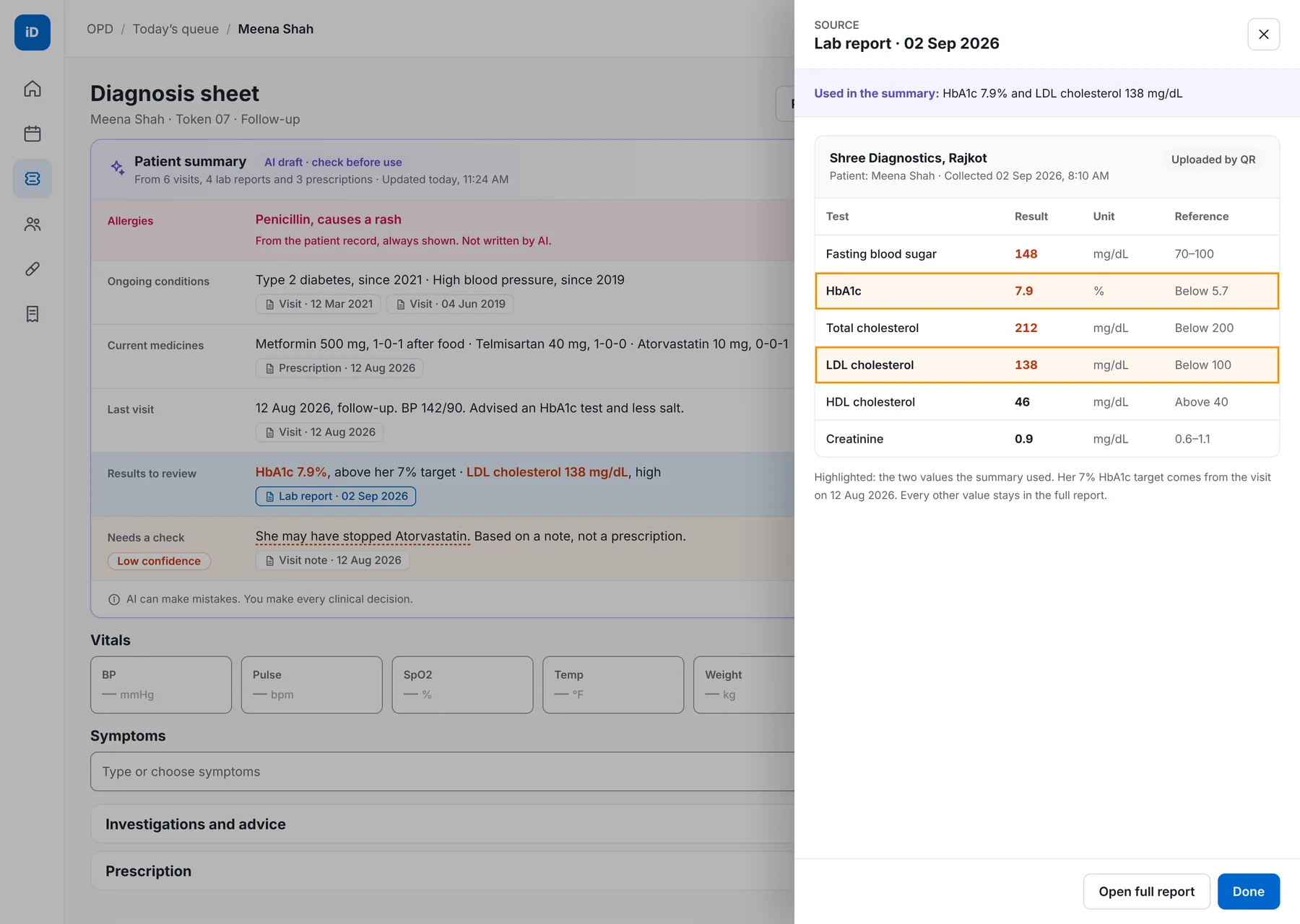
He taps a source and the original lab report opens, with the values the summary used highlighted.
-
4
He fixes what’s missingDoctorScreens 04–05
Meena mentions a vitamin D supplement, so he adds it. He flags the line the AI wasn’t sure about.
-
5
He carries on with the consultDoctor
Vitals, symptoms, prescription: every decision is his. The summary never changes her record.
Who does what
| The AI | The doctor |
|---|---|
| Reads the whole history | Checks the summary |
| Writes a short draft | Confirms, edits or flags lines |
| Links every line to its source | Decides the treatment |
| Marks what it isn’t sure about | Asks the patient when something is unclear |
Five rules for a trustworthy AI feature.
These rules shaped every screen. In an interview, each one points to a specific design decision.
The AI drafts, the doctor decides
Every line can be confirmed, edited or flagged. Nothing changes the medical record.
Every line shows its source
Each point links to the visit, prescription or report it came from.
Uncertainty is visible
Lines based on weak evidence are marked ‘Low confidence’ and highlighted.
Safety never depends on AI
Allergies come straight from the patient record, in every state.
It never blocks the consult
Loading, new-patient and error states all let the doctor carry on.
Seven screens, from the queue to every edge state.
Each screen is built on the I-Digi Care design system, with one consistent example patient.
Screen 01
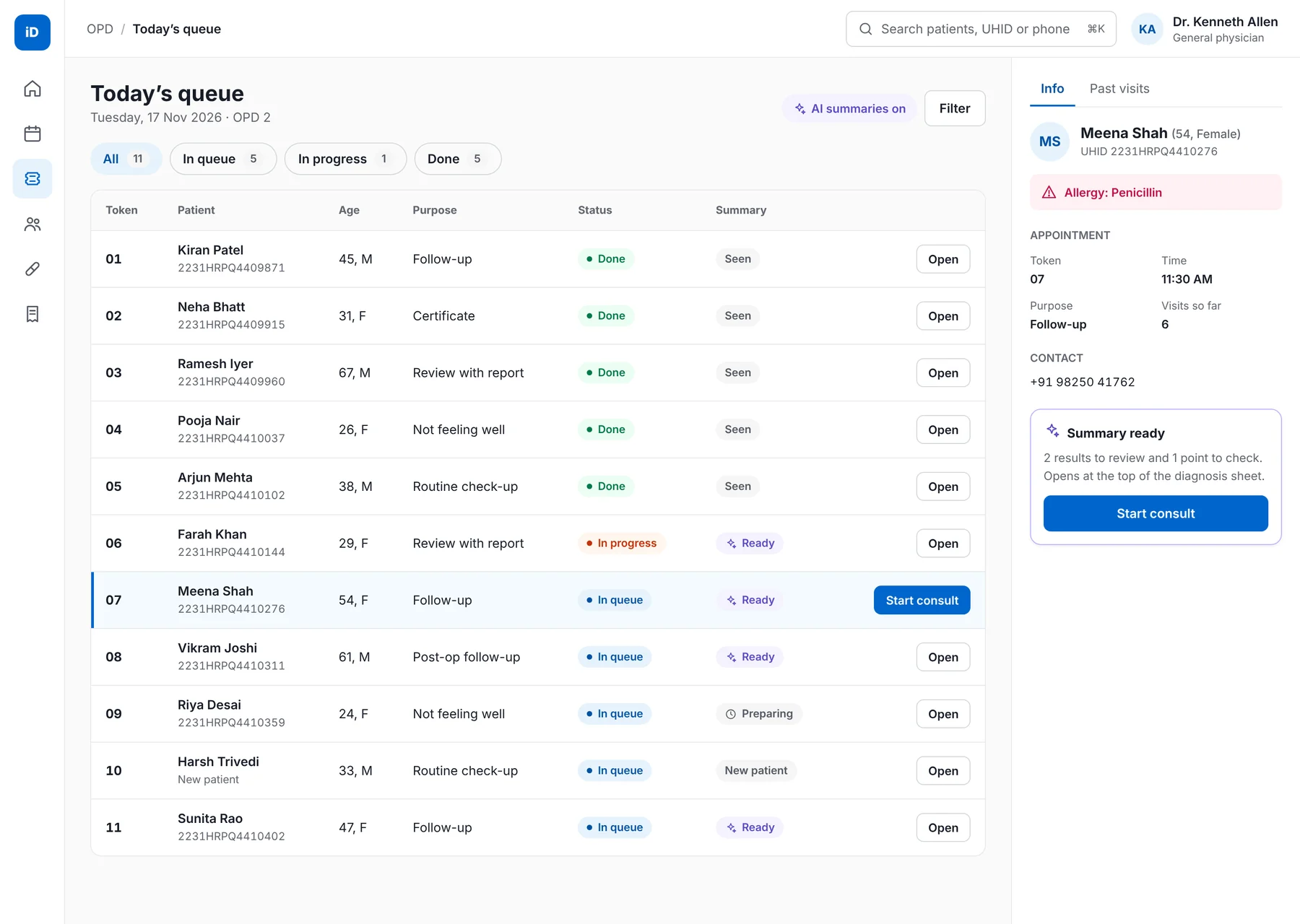
The queue shows when a summary is ready
What you see
Doctors see at a glance whose summary is ready, still preparing, or not possible yet.
My decisions
- ‘Ready’, ‘Preparing’ and ‘New patient’ states per patient
- A preview card: 2 results to review, 1 point to check
- AI summaries can be switched off
Screen 02
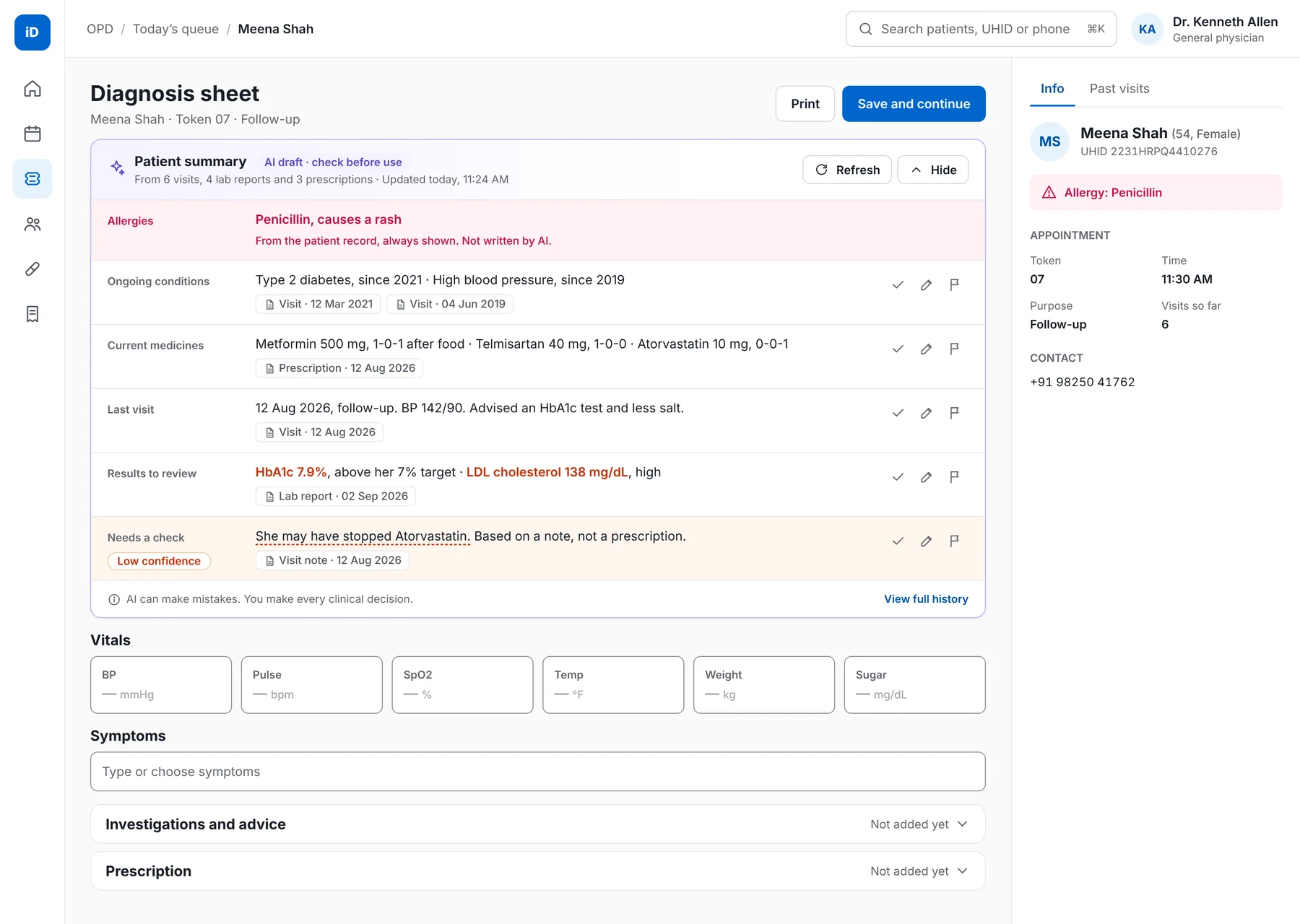
The summary, at the top of the diagnosis sheet
What you see
Five sections in the order a doctor thinks, each with its source and quick actions.
My decisions
- Allergies first, straight from the patient record
- Results above target highlighted
- One line marked low confidence
AI draft label
Says clearly what this is, and that it needs checking.
Allergies from the record
Pinned first, never written by AI.
Sources on every line
Tap to see the original visit or report.
Confirm, edit, flag
Three quick actions on every line.
Low confidence
Weak evidence is marked and highlighted.
A plain reminder
AI can make mistakes; the doctor decides.
Screen 03
Every line can be checked against its source
What you see
Tapping a source opens the original report beside the summary, with the exact values it used highlighted.
My decisions
- The report opens in a side panel; the summary stays visible
- Both values used are highlighted in the report
- Her own HbA1c target is explained
Part 2 of 2
Flags, edge states, safety, and the next AI idea.